Keyword clustering: how to group keywords into pages with a free spreadsheet, and when a paid tool is worth it
Keyword clustering decides how many pages your site needs. The free method compares Google results in a spreadsheet; paid tools only pay off on big lists.
Keyword clustering means grouping keywords that Google answers with the same pages, so each group becomes one page on your site. The free way: search each keyword, copy the top 10 results into a spreadsheet, and count how many results two keywords share. Three or more shared results usually means one page. Paid tools do the same thing faster on big lists.
This page is for owners and small marketing teams with a list of keywords and no clear idea how many pages it should become. It covers the method, the spreadsheet formula, the rule for deciding, and the point where a tool such as Keyword Insights or Ahrefs is worth paying for.
The short version
- Keyword clustering groups keywords by search intent so one page targets each group, which stops two of your pages competing for the same search.
- The most reliable free method compares Google’s top 10 results for each keyword. Keywords that share 3 or more of the same URLs usually belong on one page. That is a working rule, not a Google rule.
- Google’s spam policies class “substantially similar pages” built to rank for similar searches as doorway abuse, so clustering also tells you which pages not to build.
- Keyword Insights charges 1 credit per keyword, and its Basic plan is $58 a month for 10,000 credits. Ahrefs groups keywords by Parent Topic on plans from $129 a month.
- Under about 100 keywords, the free spreadsheet method is enough. The search work, not the maths, is what makes big lists slow.
What is keyword clustering?
Keyword clustering is the job of sorting a keyword list into groups that one page can rank for. Two keywords belong together when a searcher typing either one wants the same answer, and the clearest evidence of that is Google showing the same pages for both. The output is a page plan: one row per page, with its main keyword and the variants it should also cover.
There are two ways to group keywords, and they give different answers:
- By shared words (lexical). “Water heater repair” and “water heater repair cost” share words, so a word-based method groups them. It is instant and free, but it can be wrong: “roof repair” and “roof replacement” share a word and need different pages.
- By shared results (SERP-based). You look at what Google actually ranks for each keyword. If the same pages rank for both, Google treats them as the same question. This is slower and far more reliable.
The free keyword clustering tool on this site does the word-based pass in your browser, which is a good first cut before you check results by hand.
Why does keyword clustering matter for a small business site?
Because it decides how many pages you build, and both mistakes cost rankings. Too few pages, and one “Services” page tries to rank for drain cleaning, water heaters and repiping at once. Too many, and you publish near-copies. Google’s spam policies call “creating substantially similar pages that are closer to search results than a clearly defined, browseable hierarchy” doorway abuse (Google Search Central).
The too-many problem is common with local businesses. A roofer writes “Roof Repair Dallas”, “Roof Repairs Dallas TX” and “Dallas Roof Repair Company” as three pages, and they end up competing with each other, a pattern covered in why a website is not ranking on Google. Clustering shows all three are one keyword group, so they become one page.
It also stops a quieter waste: writing blog posts for keywords that a service page should own. If the results for “how much does a new roof cost” are all roofing company pricing pages, a pricing section on the roof replacement page may serve it better than a separate article.
How do you cluster keywords for free in a spreadsheet?
Search each keyword in Google, paste the top 10 result URLs into one column per keyword, and use a formula to count how many URLs each pair of columns shares. Then group the keywords whose counts pass your threshold. For a local business, run the searches signed out and from the town you serve, because local results change with location.
- Build the list. Start with the queries in Google Search Console, where the Performance report’s queries dimension “groups your data by the search query users typed” (Search Console Help). Add ideas from Google Keyword Planner and the words customers use on the phone.
- Cut it. Delete keywords you would never want a page for: jobs, DIY, towns you do not serve. Most small business lists end at 30 to 100 keywords worth checking.
- Run a word-based pass. Paste the list into the keyword clustering tool to get rough groups. You then only need to check results within and between nearby groups.
- Collect the results. For each keyword, search Google signed out (a private window) and paste the 10 organic result URLs, top to bottom, into its own column. Skip ads and the map pack.
- Count the overlap. In a comparison grid, count shared URLs for each pair with the formula below.
- Group and name. Put keywords that pass the threshold into one cluster. Name the cluster after the keyword with the most searches. That becomes the page’s main keyword.
- Map each cluster to a URL. Write the existing page that should own it, “new page”, or “skip”.
The formula, with keyword A’s ten URLs in B2:B11 and keyword B’s in C2:C11:
=SUMPRODUCT(COUNTIF(B2:B11, C2:C11))It returns a number from 0 to 10: how many of keyword B’s top 10 URLs also appear in keyword A’s top 10. It works in Google Sheets and Excel.
| Column | What goes in it | Example |
|---|---|---|
| Row 1 | The keyword | roof leak repair plano |
| Rows 2 to 11 | The 10 organic URLs, in ranking order | One full URL per cell |
| Comparison grid | Shared URLs for each keyword pair | 0 to 10 |
| Cluster | The group name you give it | Roof repair |
| Page | Where the cluster lives | /roof-repair or “new page” |
The table is the whole sheet. One tab holds the result columns, a second the comparison grid, a third the final page plan.
How many shared results mean two keywords belong on one page?
A working rule many SEO practitioners use: 3 or more shared URLs in the top 10 means one page, 0 or 1 means separate pages, and 2 means look at the results and decide. It is a convention, not a figure Google publishes. Ahrefs, which builds a similarity score into its keyword tool, reads it the same way: “high = cluster, low = don’t, middle = take your best guess” (Ahrefs).
| Shared URLs in the top 10 | What it usually means | What to do |
|---|---|---|
| 0 to 1 | Google sees two different questions | Separate pages |
| 2 | Mixed intent, or a thin result page | Read both result pages, then decide |
| 3 to 5 | Same topic, different angles | One page, with a section for the variant |
| 6 to 10 | The same question in other words | One page, variant used naturally in the copy |
The table shows the decision gets easier at the ends. Most of the time on a real list goes into the 2s.
A worked example shows how the decision plays out. Suppose a Plano roofer compares “roof repair plano” with four other keywords and gets these counts: “roof leak repair plano” shares 7 URLs, “emergency roof repair plano” shares 4, “roof replacement plano” shares 1, and “hail damage roof plano” shares 2. Leak repair and emergency repair join the roof repair page. Replacement gets its own page. Hail damage needs a look: if insurance claim pages fill its results, it is a separate page about claims.
How long does the free method take?
Most of the time goes on searching, not comparing. Each keyword needs one search and a paste of 10 URLs, roughly a minute each by hand, so 50 keywords is close to an hour of collecting. The comparisons are free once the formula is in, but they grow fast: every keyword has to be compared with every other, which is n times n minus 1, divided by 2.
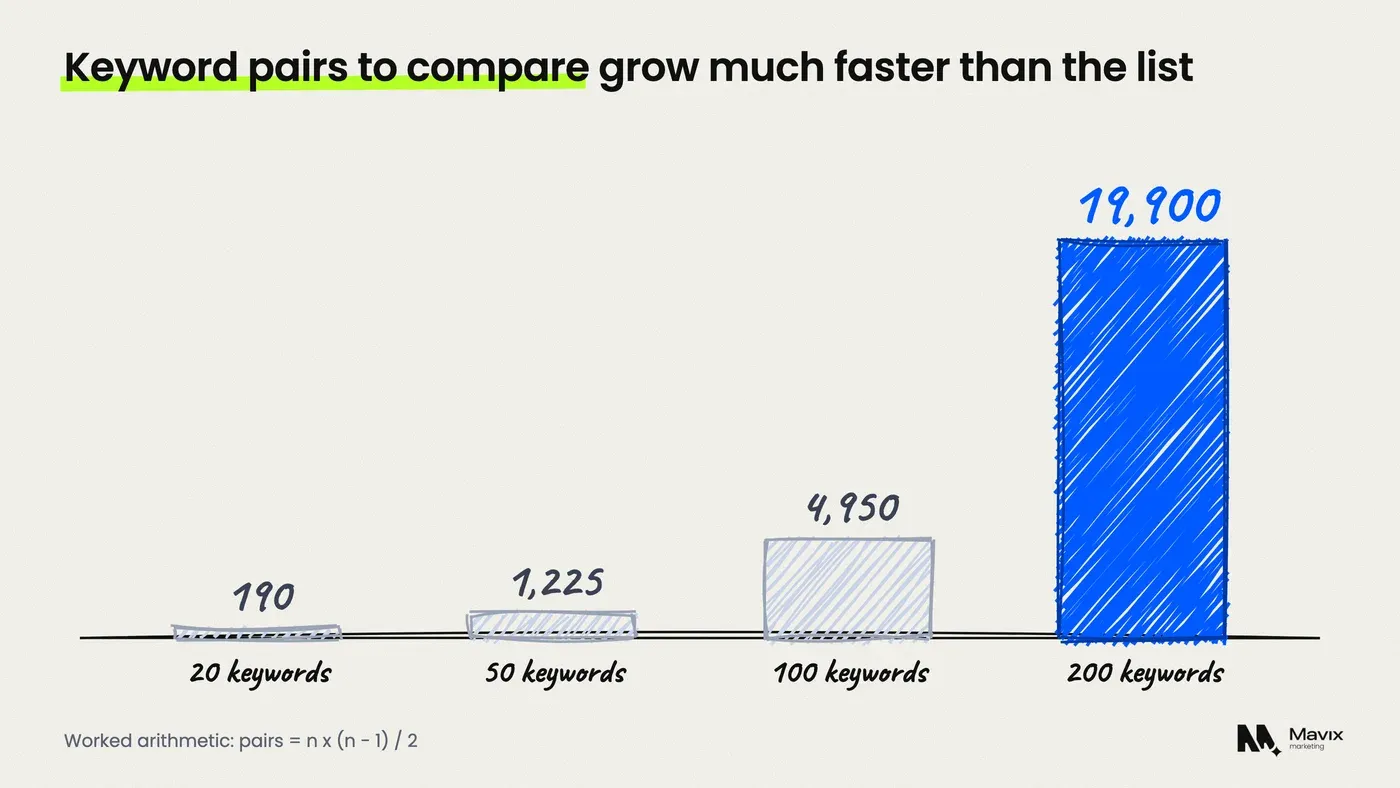
That arithmetic is why the word-based first pass helps. You do not need to compare “drain cleaning” with “water heater installation”, because they share nothing on either measure. Checking only within and between nearby groups cuts the 1,225 pairs of a 50-keyword list to a few dozen that matter.
Run the searches from your service area. A Dallas query typed from Houston can return different pages, and your clusters will be built on the wrong results.
When is a paid keyword clustering tool worth it?
A paid tool is worth it when the list is in the hundreds, when you re-cluster often, or when your time costs more than the credits. Keyword Insights charges 1 credit per keyword, and its Basic plan is $58 a month for 10,000 credits, about $5.80 per 1,000 keywords (Keyword Insights). A 500-keyword list costs about $2.90 in credits against roughly eight hours of searching by hand.
| Option | How it groups | Price checked November 2026 | Best for |
|---|---|---|---|
| Spreadsheet method | Shared top 10 URLs, checked by hand | Free, about 1 minute per keyword | Up to about 100 keywords |
| Keyword clustering tool on this site | Shared words, in the browser | Free | A fast first pass |
| Keyword Insights | Groups an uploaded list into clusters | $58 a month for 10,000 credits | Large lists, repeat runs |
| Ahrefs Keywords Explorer | Parent Topic: the keyword sending most traffic to the top-ranking page | From $129 a month | Teams already paying for Ahrefs |
| Semrush Keyword Strategy Builder | Maps keywords to topic clusters | Semrush plans from $139 a month | Teams already paying for Semrush |
The table shows the gap between free and paid is time, not quality. Ahrefs defines Parent Topic as “the keyword sending the most traffic to the top-ranking page”, so it groups by the top result only, which is quicker but less exact than comparing all ten. Ahrefs plans start at $129 a month (Ahrefs pricing). Semrush says its tool will “generate a content plan that maps your keywords to topic clusters” (Semrush), on plans from $139 a month (Semrush pricing).

For a local business with 40 service and town keywords, none of the paid tools is needed. Buy one when you are planning a full site or a content programme with several hundred keywords.
What do you do with the clusters once you have them?
Turn each cluster into one line of a page plan: the URL that owns it, its main keyword and the variants the page should answer. Then compare the plan with your site. Clusters with no page are content to write. Two pages chasing one cluster should be merged, with a redirect from the weaker one.
For local businesses, two decisions matter most:
- Town pages. Only build a page for a town when its results differ from your main town’s and you have something real to say there: jobs done, local rules, travel times. Otherwise the town is a variant on the main page. The guide to service area pages that rank covers what each one needs.
- Linking. Pages in the same topic should link to each other with descriptive anchor text. The post on internal linking for small business websites shows the hub and spoke pattern.
If you want the clustering and page plan done as part of the work, our SEO service starts every new site or rebuild with a SERP-based keyword map, so each page has one job.
Where keyword clustering goes wrong
Clustering is a decision aid, not an answer machine, and it fails in predictable ways:
- Results change. A cluster built in March may not hold in October. Recheck the top keywords each year, or after a Google algorithm update that moves your rankings.
- Location skews it. Local searches return different pages in different towns. Clusters built from the wrong place mislead.
- Low-volume keywords give thin results. For very rare searches Google’s top 10 can be a mixed bag, and overlap counts mean little.
- It does not tell you what to write. It says which keywords share a page, not what that page must contain to rank.
- It is not a reason to build everything. A cluster with no buyers behind it does not need a page, however clean the grouping.
Questions people ask about keyword clustering
Can I cluster keywords with ChatGPT?
You can ask a chatbot to group a list by meaning, and it will produce tidy groups fast. It cannot see what Google ranks for each keyword, so it is a word and meaning method, like any lexical pass. Use it for a first cut, then check the borderline pairs against the real search results before you decide to build or merge a page.
How many keywords should one page target?
As many as fall into its cluster. A good service page often ranks for dozens of variants of one main keyword, because Google treats them as one question. The limit is intent, not a number: when the results for a keyword stop sharing pages with your main keyword, it needs its own page.
Is keyword clustering the same as topic clusters?
No. Keyword clustering groups keywords that one page should target. A topic cluster is a set of pages on related subjects, usually a main hub page linked to supporting pages. You use keyword clustering to decide the pages, then organise those pages into topic clusters with internal links.
Does Google Keyword Planner group keywords?
Keyword Planner suggests related keyword ideas with search volume ranges, but it does not tell you which keywords share a results page. Use it to build the list. Then do the grouping by comparing results, or with a clustering tool, before you decide on pages.
How often should I re-cluster my keywords?
For a small business site, once a year is enough, plus whenever you plan a new section or see two of your pages swapping places for one keyword in Search Console. That swap is a sign the two pages sit in one cluster. The guide to Google Search Console for beginners shows where to see it.
What if two keywords share exactly 2 results?
Open both results pages and look at what kind of pages rank. If both show service pages from local businesses, put them on one page. If one shows guides and the other shows company pages, the intent differs and they need separate pages. Search volume can break a tie: give the bigger keyword the page and cover the smaller one as a section.
The bottom line
If your list is under 100 keywords, do the spreadsheet method this week: search, paste, count, and build only the pages the clusters justify. Pay for a tool when the list runs to hundreds or you are planning a full site, because at that size the credits cost less than your time.
If you would rather hand the keyword map to someone, get your keywords mapped to pages for free. You get a page plan with each cluster’s main keyword and the page that should own it, usually within one working day. SEO pricing shows what ongoing work costs.
Free review
Want this looked at on your own site?
Send the address. A person reads it and writes back with the two or three things that would move your enquiry number first. Free, and yours to keep whether you hire us or not.